Architecture Overview
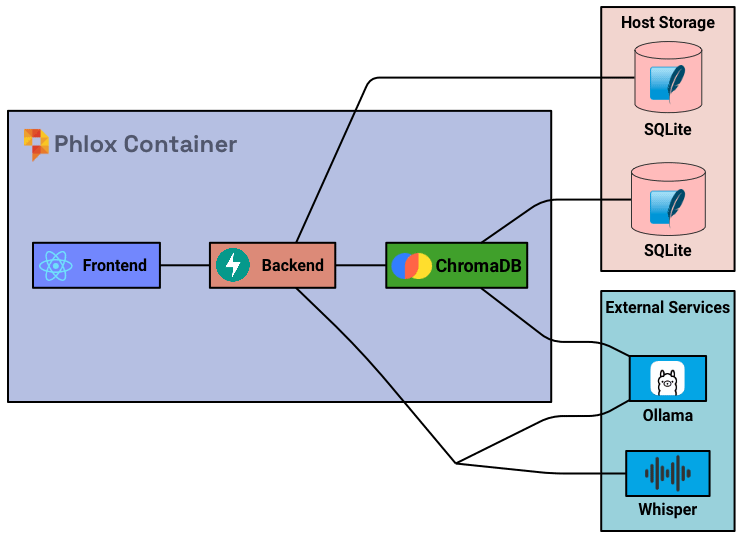
Phlox is a local-first application: a React frontend, a FastAPI backend, a SQLCipher-encrypted SQLite database, and (on desktop) bundled inference engines. The frontend, backend, and inference processes all run on the user's machine.
Technical Stack
- Frontend: React + Chakra UI, built with Vite. Localised with i18next (English ships; community translations welcome).
- Backend: FastAPI (Python).
- Database: SQLite, encrypted at rest with SQLCipher.
- Vector DB: sqlite-vec (a separate
documents.sqlitefile). - Desktop Wrapper: Tauri (v2).
- LLM Backend: any OpenAI-compatible endpoint (incl. Ollama), or the bundled llama.cpp server.
- Transcription: any OpenAI Whisper-compatible endpoint, or the bundled parakeet.cpp server.
- Embeddings: Qwen3-Embedding, served by a second bundled llama.cpp process (desktop).
Components
Frontend (React / Chakra UI)
- User interface and interactions.
- API calls to the backend (cached with an SWR layer).
- Audio recording and playback (WebAudio
AudioContext). - PDF processing and vision rendering (client-side via PDF.js).
- Client-side PDF form filling from chat artifacts.
Backend (FastAPI)
- REST API endpoints.
- Core application logic.
- Integrates with the LLM, transcription, and embedding endpoints (bundled or external), plus sqlite-vec.
- Database operations.
- MCP server management and tool routing.
- Middleware: security headers, rate limiting, authentication (username/password sessions, proxy auth with a trusted-proxy allowlist, and a desktop local-token guard), request-size caps, audit logging.
Database (SQLite + SQLCipher)
- Local file-based storage, encrypted at rest. This is
phlox_database.sqlite. - Encryption key supplied two ways:
- Docker:
DB_ENCRYPTION_KEYenv var (or Podman secret at/run/secrets/db_encryption_key). - Desktop: user passphrase, hex-encoded by Tauri and derived inside SQLCipher with PBKDF2-HMAC-SHA512. The passphrase is not cached in the OS keychain — it must be re-entered every launch.
- Docker:
- Runs in WAL mode; the
-wal/-shmsidecar files are backed up before migrations. - Stores: patient profiles, encounters, clinical notes, templates, letter templates, todos, config, prompts, options, user settings, MCP servers, the audit log, and the users and sessions tables backing authentication.
- Per-user ownership: encounters, jobs, letters, personal templates, todos, user settings, and RAG document collections carry an owner column and are scoped to the signed-in user (see Users & Authentication).
Separate literature database: reference material you upload (journal articles, guidelines) and its vector embeddings live in a second, unencrypted
documents.sqlitefile, not the clinical database. It is intended for non-PHI material — keep PHI out of document collections.
LLM
- Local inference via the bundled llama.cpp server (desktop), or remote OpenAI-compatible/Ollama endpoints.
- On desktop, when a multimodal projector (
mmproj) file is present it is loaded into the LLM server to enable vision. - Handles: note generation, summaries, chat & tool-calling, RAG queries, reasoning/citations, and document/vision processing.
Embeddings (desktop)
- A second bundled llama.cpp process runs in
--embeddingmode to serve the Qwen3-Embedding model for RAG. This sidecar is what powers literature/knowledge-base search.
Tool System
- Built-in tools registered in the tool registry (16 tools — see AI Features for the full list). Tools that call external services (PubMed, Wikipedia) ship disabled by default.
- MCP tools loaded dynamically from external MCP servers over SSE transport.
- The tool executor dispatches calls and handles streaming vs non-streaming responses.
- Supports interleaved thinking / tool-calling (up to 10 rounds) for complex multi-step queries.
Transcription
- Compatible with any Whisper endpoint, or uses the bundled parakeet.cpp engine (Omi Med STT v1) on desktop.
- Converts audio to text; configurable service selection in Settings.
Transcription Flow
Note generation breaks the problem into stages so smaller, locally-hosted models stay coherent:
- Audio Recording/Upload — the browser records audio (WebAudio) or accepts a file upload; audio is sent to the backend as WAV.
- Initial Transcription — the configured Whisper endpoint (or bundled parakeet.cpp) returns raw text with timestamps; segments are combined into a single transcript.
- Template Processing (LLM) — the transcript is broken into template fields to manage context length. Each field is processed concurrently to:
- Extract key points as structured JSON,
- Perform content refinement,
- Apply formatting. This staged approach helps smaller models by chunking long transcripts, constraining outputs to JSON, allowing multiple focused refinement passes, and reducing hallucination risk.
- Final Assembly — processed fields are combined into the complete note; patient context is merged; formatting rules are applied; results are returned to the frontend.
Example flow for a single field:
Audio → Raw Transcription → JSON Extraction → Refinement (style + adaptive rules) → Final Output
Live Agent
The live agent streams the consultation and drafts the note in real time. It is a separate hot loop around the same building blocks (transcription, LLM, tools), tuned for latency and prompt-cache friendliness.
Client audio pipeline
- The recorder feeds a Web Worker running the bundled TEN VAD (voice-activity detection) WebAssembly module — no audio leaves the machine to detect speech.
- An utterance segmenter closes a segment after 400 ms of silence or 15 s maximum, emitting one WAV blob per utterance; the tail is flushed when the session stops.
- Utterances are uploaded as they complete; session events (status, activity, artifacts, transcript) stream back over SSE, with reconnect replay that restores state without re-triggering the note-field animations.
Server engine (/api/agent-live)
- Session lifecycle endpoints (
POST /sessions,.../audio,GET .../eventsfor SSE, plus feedback/jobs/tidy/stop), rate-limited to 120 req/min because audio segments arrive every few seconds during a visit. Idle sessions are pruned after 4 h. - Each session keeps an append-only conversation so the LLM's prompt cache stays warm; caches are pre-warmed when the session starts (the "Warming up the agent…" state).
The hot loop
Each utterance passes through:
- Transcription — the configured Whisper endpoint (live utterances can be routed to a separate
WHISPER_STREAM_URL, e.g. a faster streaming model). - Speaker labelling — lightweight local diarization with the CAM++ embedding model (sherpa-onnx, CPU): per-session speaker centroids matched by cosine similarity (≥ 0.62), updated with exponential moving averages, capped at four speakers (S1–S4, with S? for unattributed speech).
- Gate — a cheap single-token classification (temperature 0) labels the utterance SKIP (not for the note), NOTE, or ACT (a spoken request). It runs on the secondary model when one is configured (e.g. a small Qwen on Docker), falling back to the primary model. It prefers a top-logprob readout of the three option tokens — computed in one decode step, with token-prefix matching to absorb tokenizer splits — falling back to one-word generation on providers without logprobs. Because small models systematically under-call SKIP at argmax, a NOTE verdict of ≤ 8 words carrying SKIP probability mass ≥ 0.05 is downgraded to SKIP (never the reverse, never to ACT). On gate failure it fails open to NOTE on local models (a redundant tick is cheap) and closed to SKIP on cloud providers (cost control).
- Agent tick — NOTE/ACT utterances run a free-form tool-calling loop on the primary model, with live-session tools (
update_note_field,append_to_field,stage_artifact,stage_letter,save_letter,get_jobs/set_jobs,wrap_up) alongside the full chat tool registry including MCP servers.
A debounce backstop (45 s / 40 words; 12 s / 15 words at the start of the visit; hard cap 400 words) re-sends SKIP-classified content if enough speech accumulates, bounding missed note content; queued speech surfaces as the backlog counter in the live panel. Every ~3 minutes a tidy tick consolidates the note and matches each field's style example — never touching fields the clinician has edited by hand (the agent may only append to those).
Local inference note
On desktop local mode there is a single model, so the gate shares it with the agent loop: the bundled llama.cpp server runs 2 slots with continuous batching and one unified 32k KV pool. Gate calls run (and stay KV-cached) alongside a long agent tick instead of queueing behind it or evicting its prompt cache, and the unified pool means neither sequence is capped at half the context.
RAG (sqlite-vec)
- Vector search over your uploaded reference literature, kept in a separate
documents.sqlitefile (not the encrypted clinical database). Intended for non-PHI material such as journal articles and guidelines. - Collections are scoped per user — each user's uploads and embeddings are visible only to them.
- Requires a tool-calling model and (on desktop) the embedding model to be available.
- Enables context-aware literature and knowledge-base queries.
- Stores document embeddings generated by the embedding sidecar (desktop) or an external embedding endpoint.
Document / Vision Processing
- Hybrid pipeline with automatic capability probing.
- When the configured model supports vision, PDFs and images are sent directly for visual analysis.
- Falls back to text extraction (pypdf) with OCR (Tesseract, Docker builds only) when vision is unavailable.
- Processing mode configurable per deployment: Auto (default), Vision, or OCR — see Settings.
Audit Logging
- Every API request is recorded (method, path, status, actor, client IP, duration) — never request/response bodies. See Security.
Reliability & Performance Notes
- SWR cache layer on the frontend reduces redundant API calls.
- Parent-PID watchdog: in desktop builds the server self-terminates if its parent Tauri process dies, so there are no orphaned server processes.
- Output quality: smaller models can hallucinate or lose coherence with long outputs. Chunking and JSON extraction help maintain structure and accuracy within resource constraints.
- Refinement passes: multiple focused passes produce better results than single large outputs with smaller models. Adaptive refinement makes these passes more effective by incorporating your personal editing preferences.
Data Persistence
- SQLite database and vector data are persisted on the host.
- Docker: volume mount
./data:/usr/src/app/data. - Desktop (macOS):
~/Library/Application Support/Phlox/. - Data is preserved across restarts.
See the README for a side-by-side diagram comparing this pipeline against single-shot generation, including the adaptive-refinement feedback loop.